Network Online Course
Lesson 1 - Network Basics
C. Processing strategies
Processing strategies
- Processing determines bandwidth
- Multi-user host
- Distributed processing
- Office automation vs. transactional processing
- Client/server
Processing strategies
Another way to look at networks is by the location of the processing. This effects the bandwidth needed by the system as well as its scalability.The capabilities of the nodes in a system dictate where the processing takes place. The three common strategies are as follows.
- Multi-user host, also called centralized computing. This describes a hierarchical system in which terminals have no processors. There is no alternative to the hosts doing the processing.
- Distributed processing. This describes standard LAN systems in which processing is done by the workstations.
- Client/server, also known as collaborative or cooperative computing. This describes a system in which an application is split among different computers, each doing a share of the work.
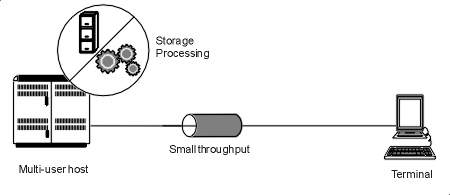
Figure 4: Multi-user host
Multi-user host
Examples of multi-user hosts include mainframe and minicomputers as well as other platforms (Intel, RISC based) which run multi-user operating systems, such as UNIX.All the processing is done by the Central Processing Unit of the host computer. Each user takes a slice of the host’s time (time slicing). The terminals contain very little processing power. Note the following points:
- Transmission between host and terminal is low capacity (typically 2400, 4800 or 9600 bps) because only the screen information has to be sent.
- The speed of execution of the program is entirely dependent on the host. The type of CPU, memory and the Operating System all effect performance.
- Extra users degrade performance. The fixed processing power of the host has to be divided up among more terminals.
- Increasing the processing power of the host requires the purchase of another expensive machine. The system, therefore, scales in large increments.
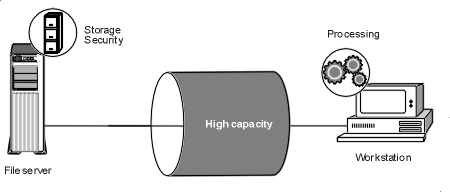
Figure 5: Distributed processing
Distributed Processing
Processing (program execution) is done in the workstation. There must be enough memory in the workstation to accommodate the program and the network software. The network merely provides storage for files. Note the following points:- The capacity of a LAN to move information is very high (typically greater than 1 Mbps) because both programs and data must move along the cable.
- The speed of execution of a program is partially dependent on the LAN for file retrieval and partially on the workstation for processing those files.
- Extra workstations degrade the network because of their demands on the server to provide files.
- The processing power of the local area network can be added to in small increments just by buying more workstations as needed. Even adding file servers is less expensive than buying minicomputers. Therefore, a LAN is said to be infinitely scalable in small increments.
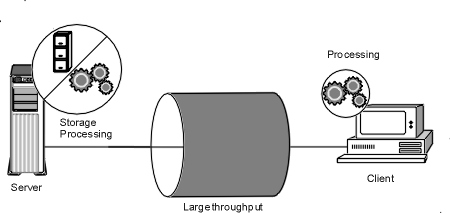
Figure 6: Client/server architecture
Client/Server
Certain types of applications generate a high volume of traffic on the network. The best example of this is a database. If we can move some of the functions that are common to all users from the workstation to a central computer, we can cut down on the traffic and boost performance.The Server
In the client/server architecture the application is divided into two parts. The server portion runs in a central computer (the server) and performs those functions that are common to all users. This might include keeping database records, sorting, filtering, and controlling security. The server accepts formatted requests from the client, processes them and returns the results.Stored procedures
Tasks that are commonly and frequently done can be simplified if the code is pre-written by the database programmer and don’t have to be re-invented by the application developer. Called “stored procedures”, these routines execute on the server and speed up development of database applications.The client
The balance of the application runs inside the workstation (the client). This includes the user interface, such as the data entry screens or a microcomputer program such as a spreadsheet or graphing program. The client does not have to be the same type of application as the server, nor does it have to be written by the same programmer.Benefits
The advantages to this approach include more functionality, better security, higher performance and more flexibility.Currently, the most developed applications of this kind are database servers. Another good example is the Internet which is built on the client/server architecture.
Making a request
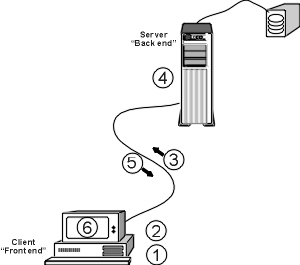
Figure 7: Making a request under Client/server
Making a request under client/server requires the coordination of both machines. Refer to figure 7 for the following discussion of the six required steps.
- The client requests data.
- The request is translated into a query that the server will understand. For a database, this is usually an SQL (Structured Query Language) or an ODBC (Open Database Connectivity) request. Over the Internet, the request would be in HTTP, FTP, etc. format depending on the service.
- The request is sent to the server.
- The server fulfills the request. For example, it may do a search or filter some records, update records or create a report. It may be as simple as finding a file.
- The requested data is returned to the client.
- The data is presented to the user.
Why distributed processing is not client/server
In order to keep these two processing models separate, you must ask the question “Where is the processing taking place?” In distributed processing the complete program executes at the workstation. In client/server, part of the application executes in the server and part in the workstation. Storage of the data in both cases is at the server.Network architecture and workstations
The different network architectures are evident in new types of workstations that are now available. The following machines are not meant to replace full featured personal computers which are needed by modern knowledge workers. Instead, they will find a niche in large organizations which need centralized control and management, low cost of ownership and have specialized needs.Network Computer (NC)
This type of computer is attached to a network but has very little local storage, a floppy disk but not a hard disk. It receives all of its programs from a server on the network and stores all of its data there. The programs are expected to be written in Java, be accessible through a Web browser, and in general, follow the client/server architecture. The centralized management and control of this kind of system plus the low cost of the NC will make it attractive to organizations who need single purpose machines.Network PC (NetPC)
This is a pared down computer, attached to a network, running Windows and using a file server for applications and data as much as possible. Unlike the NC, the NetPC can still function if the network is down because it has some local storage. This will appeal to organizations who want to centralize management as much as possible but still want to use traditional PC applications on a familiar, though pared down, computer.Windows-based Terminal (WBTs or WinTerms)
In this kind of system, standard Windows applications, such as Word or Excel, are being run on a Windows 2000/2003 server. Users are sitting in front of their own computers when they run these applications in the remote server. They are using a “terminal” window on their own computer for this purpose. The obvious question is what is the benefit to this system. First, the user’s computer does not need to meet the hardware or operating system requirements for the application. Older computers do not need to be upgraded to run the newer applications. Second, the administrator can exert centralized control over the applications. The technology was developed by Citrix Systems under the name WinFrame but has been licensed to Microsoft and is included in Windows 2000 and 2003 Server editions.Exercise 1-3: Processing strategies
1. Match up
Below are characteristics of computing systems. Use them to answer the questions on processing strategies
A. Complete file has to be transferred for processingB. Tight control by MIS department
C. Speed of execution is entirely dependent on the host
D. Only relevant data needs to be transmitted across network
E. Makes use of local processing power
F. Low network bandwidth for communications between machines
G. Scales in small increments
H. Processing can be done in the most capable machine
I. Requires high network bandwidth to achieve reasonable performance
J. Two machines must understand the same application protocol
K. Scales in large increments
L. It is complicated to synchronize applications running on multiple computers
1. Name two advantages of centralized computing (multi-user host). _______ _______
2. Name two disadvantages of distributed processing. _______ _______
3. Name two advantages of client/server. _______ _______
4. Name two disadvantages of centralized computing (multi-user host). _______ _______
5. Name two disadvantages of client/server _______ _______
6. Name two advantages of distributed processing. _______ _______
[Top of page][On to next section]