Network Online Course
Lesson 1 - Network Basics
D. Node relationships
What do you find on a network?
- Hosts
- Terminals
- Servers
- Workstations/clients
The following types of nodes may be found on a data communications system.
Host
A central computer which stores data and executes programs for terminals. It is usually associated with minicomputers or mainframes. It requires a multi-tasking, multi-user operating system such as Unix.Terminal
A computing device which is composed of a video screen and a keyboard. It allows a user to communicate with a host by typing in information or commands. The host communicates with the terminal by updating the CRT (video). Terminals cannot execute programs.Servers
A computer which serves other users of a system by providing services. Examples include file, print or communication servers.Workstation/clients
A computer which takes advantage of the services provided by servers on the network. A workstation has its own processing capabilities since it is a full fledged computer with a microprocessor. “Client” often refers to the workstation’s operating system such as Windows, Macintosh or Unix.Node relationships
- Who Controls the Network?
- Hierarchical
- Centralized file server
- Peer-to-peer network
Node relationships
There are three distinct network designs which are distinguished by the relationship of the nodes to each other. Naturally, the types of nodes involved have a great bearing on the design itself. The three types are hierarchical, centralized file server and peer-to-peer.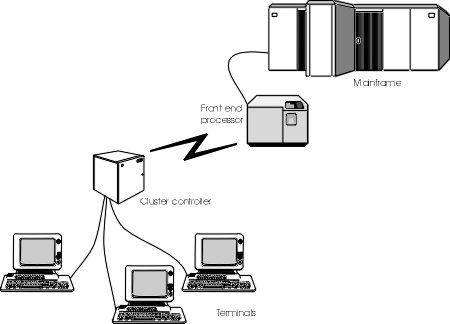
Figure 8: Hierarchical network
Hierarchical network
A hierarchical network is composed of a host machine and terminals that are subservient to it. The host initiates and controls communications with the other nodes even to the extent of polling them for information at regular intervals.IBM’s SNA network
The best example of a hierarchical network is an SNA (Systems Network Architecture) network. At the apex is the mainframe. Because the mainframe’s time is too valuable to deal with many terminals, it restricts itself to communicating with one or several front end processors (FEP). The FEP concentrates the communications it receives from multiple cluster controllers before sending it on to the mainframe. Cluster controllers each have a multitude of terminals attached to them. Cluster controllers may be at the same location as the FEP or they can be at a remote site. Cluster controllers are a natural mechanism for multiplexing multiple communication streams into one stream using a single communications line.
As you can see, at each level of the hierarchy, a node controls the machines reporting to it and it in turn is controlled by a node above it. The mainframe at the top eventually controls the whole system.
Terminals are the only user machines on the system. A mainframe simply doesn’t know how to talk to a personal computer. Therefore, in order for a PC to communicate with a mainframe, it has to pretend to be a terminal. This is known as “terminal emulation”.This type of system is not restricted to mainframes. Any kind of system which allows a terminal to attach to it is a hierarchical system. Other examples include mini computers, Unix hosts, Bulletin Boards (BBSs) and any host on the Internet.

Figure 9: Centralized file server
Centralized file server
One type of LAN architecture uses a centralized file server to provide the majority of services to the workstations on the network. File and print services are easily the most popular but may be augmented with communication, directory, backup, fax and a number of other services.Good examples of centralized file server LANs include Novell NetWare and Windows 2000/2003 Server.
Benefits
This type of system is particular useful if the majority of a user’s work is kept on the file server. This allows easy file sharing, good security and automatic back-up. It is required for the sharing of company databases and accounting programs. In fact, centralized security and management of network resources may be the greatest benefits.Centralized servers are generally powerful machines that have been optimized to provide services to other machines. This is an efficient system since expensive resources can be concentrated on a single or small number of machines and yet, still be made available to the users of the network. In order to keep the system running, fault tolerance is usually built in.
Limitations
On the negative side, this type of system is not particularly flexible. Resources must be placed on the server to be shared. For example, a file produced by one user must be transferred to the server before it can be made available to other users. The location of printers may not be convenient to the users. Typically, centralized servers are expensive.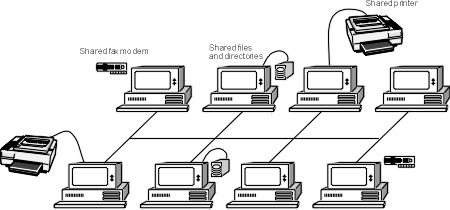
Figure 10: A peer-to-peer network
Peer-to-peer
A network in which all of the workstations can share their resources is a network of equals, hence the “peer-to-peer” label. Examples of this type of network include Windows 98, Windows 2000 Professional and Windows XP.Benefits
This type of system is very flexible because any workstation can share almost any resource which includes a wider variety than may be found on a centralized server system. For example, it is easier to share CD-ROMs and fax modems.These systems don’t need dedicated computers as servers and may be self administered. There is no administrator for the network since each user decides which resources of her computer she wants to share. This makes them more cost effective for small offices; there is no administrator and no central file server. Does this mean that there are no servers in a peer-to-peer network? Not at all. Every computer is a server as well as being a workstation.
Peer-to-peer networks tend to be simpler because they don’t have the same needs for security, performance and resource management as do centralized servers. In fact, by building the network capabilities into the desktop operating systems, network functions can be seamlessly integrated into the users’s environment. This is precisely the situation with Windows 98, Windows 2000 Professional and Windows XP.Disadvantages
On the down side they tend to have poor performance if they are built on top of DOS and/or Windows 3.1. In fact, performance is optimized for the local user and not for the network user. Security is managed at each machine and there is a wide variety in security capabilities. Windows 98 is designed for trusted environments in which security is not paramount. On the other hand, Unix and Windows XP have very robust security. In any case, security implementation is left to the user of the system and requires extra training. There is also the issue of users turning their machines off when they go home and the shared resources on these machines becoming unavailable to everyone else.Size limitations
Another name for a peer-to-peer network is a workgroup. The scope of a workgroup is generally limited to a small number of machines. This makes sense because it is complicated trying to find resources on many machines, and security and management become too difficult. For this reason, a reasonable number of machines is 10. This rule of thumb has become formalized with Windows. Microsoft restricts Windows NT Workstation, Windows 2000 Professional and Windows XP Professional to 10 connections.Does this mean that there are no workgroups with more than 10 machines? Clearly not. Large organizations may have thousands of computers running Windows. But they are also hybrid networks with centralized servers as well. These will store the company information, such as the customer database, while the users in the workgroups can share departmental information amongst themselves.
Exercise 1-4: What am I?
A modern Windows machine can take various roles in the network, either client, server or both. If a Windows 98 has a client role, it is identified as Microsoft client or Novell client. If it performs a server role, it has “file and print sharing”. Windows NT is a server and/or a workstation. The following are screen shots of the network properties of Windows 98 and NT. Identify the role that the machine has in the network.
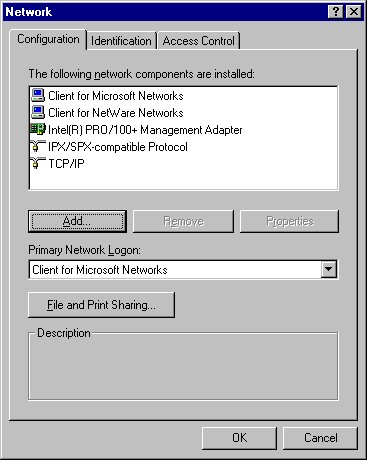 Figure 11: Windows 98
Identify the role
of this computer.
o Client only
o Server only
o Both client and server
o Neither
If client, on what network?
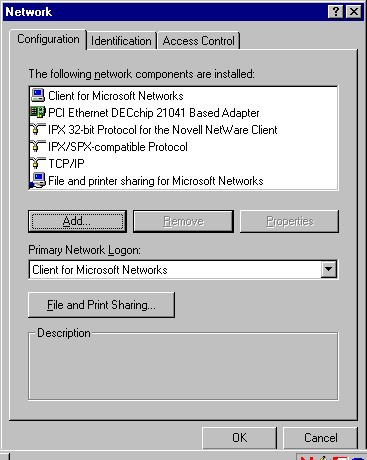 Figure 12: Windows 98
Identify the role
of this computer.
o Client only
o Server only
o Both client and server
o Neither
If client, on what network?
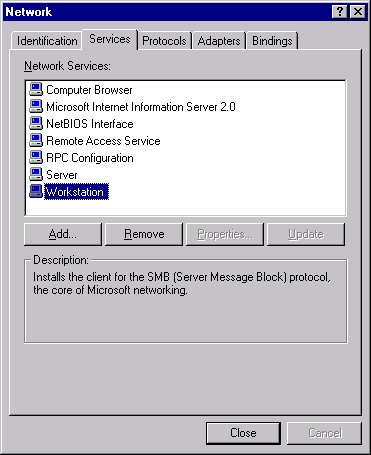 Figure 13:Windows NT
Identify the role
of this computer.
o Client only
o Server only
o Both client and server
o Neither
If client, on what network?
Exercise 1-5:Control strategies
Answer the following questions1. What are 4 advantages of peer-to-peer networks?
2. What are 2 disadvantages of centralized server networks?
3. What are 4 disadvantages of peer-to-peer networks?
4. What are 4 advantages of centralized server networks?
[Top of page][On to next section]